Why Use Presigned URLs?
Uploading files through your backend can quickly become a bottleneck, large payloads, slow response times, and unnecessary server costs. A secure and scalable alternative is uploading files directly from the frontend to Amazon S3 using presigned URLs.
Benefits
- 🚀 Faster uploads
- 🔒 Strong security guarantees
- 💸 Lower backend costs
- 📈 Infinite scalability
Flow Diagram :
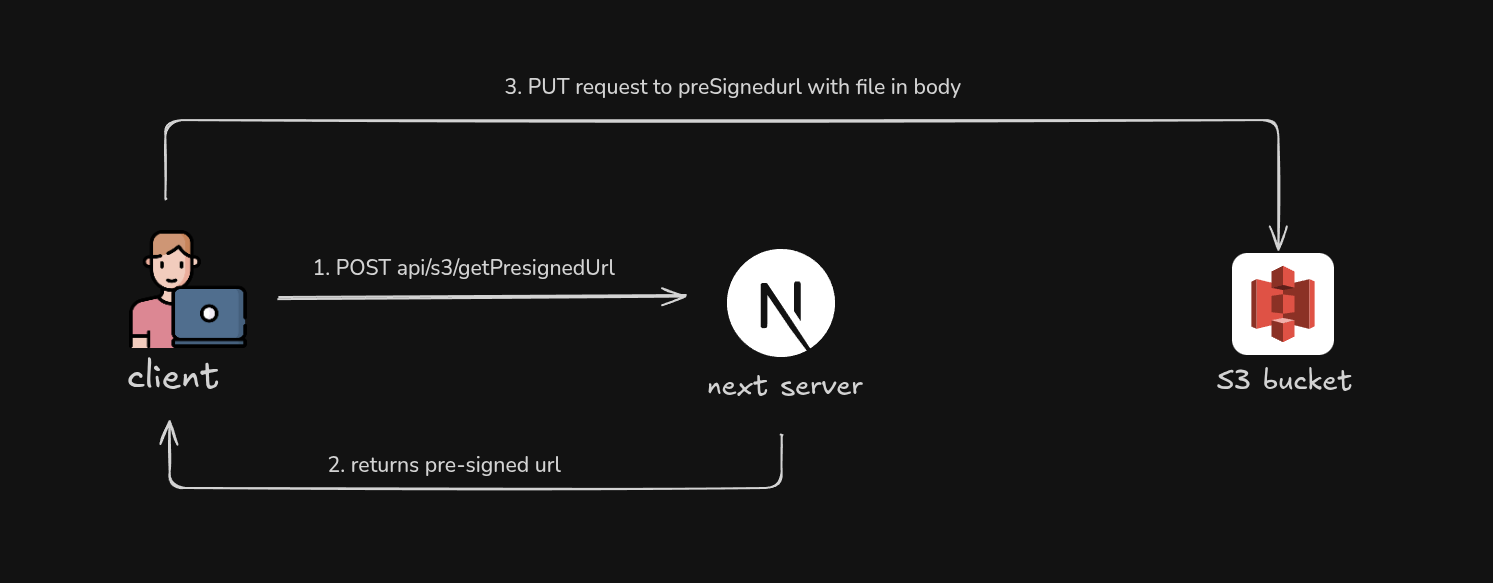
This diagram provides a high-level overview of how the presigned URL upload flow is set up.
1. Client requests a presigned URL from the Next.js server
- A presigned URL is generated on the server using the AWS SDK. The SDK uses AWS credentials from environment variables
1 /*
2 * From client component, requesting a presigned S3 URL
3 * here we're using Next.js API Routes
4 */
5 const presignedUrl = await fetch("/api/s3/getPresignedUrl", {
6 method: "POST",
7 headers: { "Content-Type": "application/json" },
8 body: JSON.stringify({
9 fileName: file?.name,
10 fileType: file?.type,
11 fileSize: file.size,
12 folderName: SERVICES_FOLDER_NAME_FOR_S3,
13 }),
14 });
15
16 /*
17 * Handling response
18 */
19 const presignedData = await presignedUrl.json()
20
21 if (!presignedData.ok) {
22 toastError(presignData?.error || "Failed to get upload URL")
23 return
24 }
25
- Quick look of how your environment variables in
.env.localshould look like
1 /*
2 * S3 bucket variables
3 */
4 AWS_S3_BUCKET_NAME=
5 AWS_REGION=
6 AWS_SECRET_ACCESS_KEY=
7 AWS_ACCESS_KEY_ID=
⚠️ Do not prefix them with NEXT_PUBLIC
2. Next.js API route creates a presigned URL using AWS SDK
path: src/app/api/s3/getPresignedUrl/route.js
1 export const runtime = "nodejs";
2
3 import { NextResponse } from "next/server";
4
5 import { S3Client, PutObjectCommand } from "@aws-sdk/client-s3";
6 import { getSignedUrl } from "@aws-sdk/s3-request-presigner";
7
8
9 /*
10 * Initialize the S3 client.
11 *
12 * SDK automatically loads up your creds (AWS_ACCESS_KEY_ID, AWS_SECRET_ACCESS_KEY)
13 * from environment variables not need to pass explicitly
14 */
15 const s3 = new S3Client({
16 region: process.env.AWS_REGION,
17 });
18
19 /**
20 * POST handler to generate a presigned S3 PUT URL.
21 *
22 * Flow:
23 * 1. Client sends file metadata (name, type, size, folder)
24 * 2. Server validates input and file size
25 * 3. Server generates a time-limited presigned URL
26 */
27 export async function POST(request) {
28 try {
29 const { fileName, fileType, fileSize, folderName } = await request.json();
30
31 if (!fileName || !fileType || !fileSize || !folderName) {
32 return NextResponse.json(
33 { error: "Missing required fields" },
34 { status: 400 }
35 );
36 }
37
38 if (fileSize > MAX_FILE_SIZE) {
39 return NextResponse.json(
40 { error: "File size exceeds 5 MB limit"},
41 { status: 400}
42 );
43 }
44
45 const key = `${folderName}/${Date.now()}_${fileName}`;
46
47 const command = new PutObjectCommand({
48 Bucket: process.env.AWS_S3_BUCKET_NAME,
49 Key: key,
50 ContentType: fileType,
51 });
52
53 const uploadUrl = await getSignedUrl(s3, command, {
54 expiresIn: 60 * 5, // 5 minutes
55 });
56
57 return NextResponse.json({
58 uploadUrl,
59 key,
60 });
61 } catch (err) {
62 console.error(err);
63 return NextResponse.json(
64 { error: "Failed to generate presigned URL" },
65 { status: 500 }
66 );
67 }
68 }
69
3. Uploading Image to S3 from client side using that Presigned URL
1 const uploadResponse = await fetch(uploadUrl, {
2 method: "PUT",
3 headers: {
4 "Content-Type": file.type,
5 },
6 body: file,
7 })
8
9 if (!uploadResponse.ok) {
10 throw new Error("Upload failed");
11 }
S3 validates the request against the parameters embedded in the URL, such as the expiration time, bucket name, object key, and access key.
Although your
AWS_ACCESS_KEY_IDis visible in the presigned URL, yourAWS_SECRET_ACCESS_KEYis never exposed at any point in the process. The signature is cryptographically generated on the server and cannot be reversed or reused beyond the URL’s expiration time.
🎉At this point, the file is already stored in S3, your backend(if using other then nextjs) was never involved in the upload itself.
4. S3 Bucket Policy & CORS Configuration :
- Make sure to give IAM user a least privilege, grant only what is strictly required.
S3 bucket policy :
1 {
2 "Version": "2012-10-17",
3 "Statement": [
4 {
5 "Sid": "EnforceHTTPSOnly",
6 "Effect": "Deny",
7 "Principal": "*",
8 "Action": "s3:*",
9 "Resource": [
10 "arn:aws:s3:::<your-bucket-name>",
11 "arn:aws:s3:::<your-bucket-name>/*"
12 ],
13 "Condition": {
14 "Bool": {
15 "aws:SecureTransport": "false"
16 }
17 }
18 },
19 {
20 "Sid": "AllowUploadToSpecificFolders",
21 "Effect": "Allow",
22 "Principal": "*",
23 "Action": ["s3:PutObject", "s3:GetObject"],
24 "Resource": "arn:aws:s3:::<your-bucket-name>/*" // you may specify specific folder here
25 }
26 ]
27 }
s3:GetObjectis optional and only required if you also generate presigned URLs for downloads
CORS Configurations of S3 Bucket
1 [
2 {
3 "AllowedHeaders": [
4 "Content-Type"
5 ],
6 "AllowedMethods": [
7 "PUT"
8 ],
9 "AllowedOrigins": [
10 "http://localhost:3000",
11 "https://your-domain.com"
12 ],
13 "ExposeHeaders": [
14 "ETag"
15 ],
16 "MaxAgeSeconds": 3000
17 }
18 ]
PUTis required for uploads- Restrict
AllowedOriginsto trusted domains only ExposeHeadersis optional but useful for debugging uploads
Final Thoughts
Direct uploads to S3 using presigned URLs are one of the most secure and scalable patterns for handling files in modern web applications.
If you’re building a Next.js application that handles user-generated content, this should be your default upload strategy.
Happy shipping and keep your buckets locked down 🔐